Working with Decompose
The Decompose Web UI is organized into pages in the navigation panel on the left. Follow the links below to learn what each page does and how it supports the decomposition workflow.
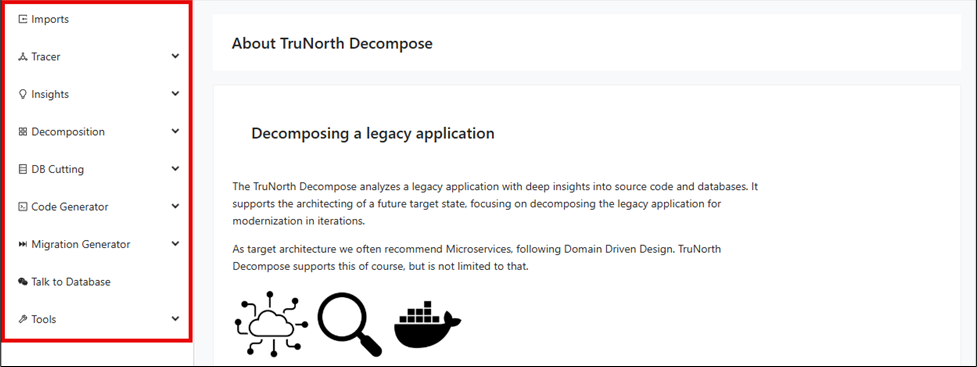
Navigation Panel
The navigation panel is the main entry point to the Decompose workflow and organizes features in the order most teams use them. Understanding what each page is for helps you move between import, analysis, decomposition, and modernization tasks without losing context. The table below summarizes the primary pages available from the left-side navigation.
| Page | Description |
|---|---|
| Imports | Import legacy application artifacts for deep source code and database analysis, kickstarting your decomposition journey. |
| Tracer | Dynamically trace user interactions and telemetry to uncover application behavior, providing vital context for decomposition. |
| Insights | Visualize relationships between code modules and database structures to inform architecture and modernization efforts. |
| Decomposition | Tag, group, and visually organize modules to iteratively break down your legacy application into meaningful sub-domains. |
| DB Cutting | Identify, segment, and remodel legacy databases, supporting the shift to modern, domain-driven data architectures. |
| Code Generator | Automatically generate modern database access code and service skeletons from legacy application and schema analysis. |
| Migration Generator | Generate detailed reports and tools to guide data migration from legacy systems to new target state databases. |
| Talk to Database | Interact with your database through an AI-powered conversational UI to quickly explore tables, columns, and relationships. |
| Tools | Access a suite of powerful utilities for analysis, transformation, and reporting throughout your modernization journey. |
About Decompose
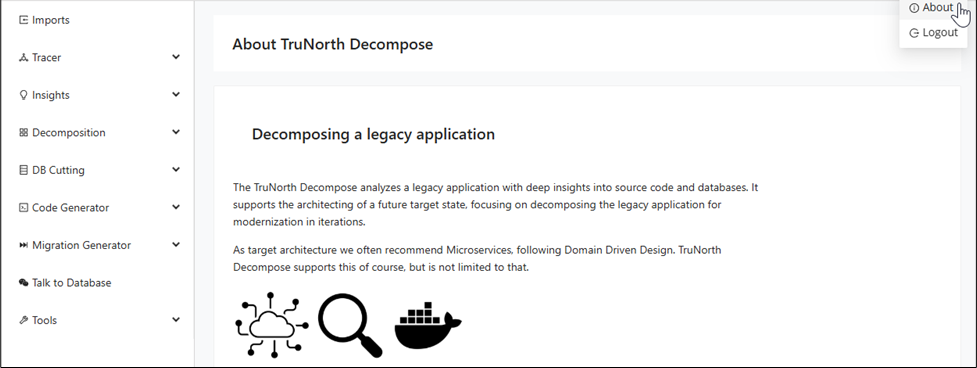
After creating your client and project, the first page introduced by Decompose is "About Decompose". Before diving into the application, take a moment to read through "About Decompose" to see how these tools and insights work together to guide your journey from legacy to modern architecture. You can always navigate back to "About Decompose" by clicking on About from the drop-down menu under the log-in info.
Tracer
Before you analyze and decompose an application, Decompose needs information about the application's internals. Besides static analysis, Decompose can also trace live interactions while people use the legacy application.
-
Instrumentation of the legacy application.
-
Analyzing telemetry data and log files.
-
Calculating taxonomies based on captured user actions.
-
Initial decomposition of the system.
The data that are collected by the Tracer are a good starting point for further analysis and decomposition, especially when there are no static code analysis data available.
Insights
Decompose identifies the relationships between source code and database tables/columns. Therefore it needs to know about:
-
Source code modules of the application.
-
The call chain between the source code modules.
-
The queries that are sent from the application to the database.
-
The database schema(s).
While the database cutter can work completely independent of other tools, it is recommended to use it together with our other products. Other products for static or dynamic source code analysis provide data about source code modules and their relationships. The integrated DB-Crawler reveals all necessary information about the legacy databases.
Decomposition
When working on large legacy applications, you usually do not want to modernize that with a big bang release. Instead you could want to modernize iteratively, moving parts of the old application to a new architecture and infrastructure.
Decompose will help you in doing so by offering a variety of options for decomposing your application.
-
You can create Taxonomies, for example, you tag a set of modules with a name.
-
You can automatically tag modules that belong together to a sub-application.
-
You can automatically tag modules that are accessing shared data.
-
You can visually edit taxonomies.
-
You can define sub-applications within your large legacy application.
In Domain Driven Design, these would be called domains, or Bounded Contexts. -
You can ask the Cutter to automatically split your application into domains.
Modernization
Decompose support the modernization of legacy applications and its databases:
-
Automatically define data for Bounded Contexts.
-
Analyze queries from the application to tables/columns in the database.
-
Design new databases for modernized parts of the old application.
-
Identify conflicts between Bounded Contexts.
-
Model interfaces between Bounded Contexts.
-
Generate reports for supporting the migration of data out of a legacy database into multiple target databases.
Generator
Decompose enables AI-supported source code generation from the collected knowledge about the database and the legacy application:
-
Generate the database layer for the modernized application, leveraging standard object-relational mappers.
-
Convert the SQL queries from your legacy database dialect to the SQL dialect of the desired modernized database.
-
Generate the repositories that use the generated queries.
-
Generate a service layer skeleton that leverages the generated entities, DTOs and queries.
Talk to Database
Decompose enables AI-supported discovery of your database assets, transforming collected knowledge about your database schema into an interactive, conversational experience. You can talk directly to the database by asking questions in natural language. Through the chat UI, you can ask "Give me details of TableA", "Show me columns of the table" and receive immediate, relevant answers from our GenAI-powered chatbot.