Basic concepts
This page introduces the core ideas behind Decompose and the terminology used throughout the product. It gives you the background needed to interpret the UI, workflows, and reports correctly. Read this page first if you are new to decomposition or want a shared vocabulary before moving into feature-specific guides.
Decompose
Most legacy applications and databases are monolithic and lack a clear separation of domains/contexts. When modernizing applications, we aim to decompose such monolith applications and databases following a domain-driven design approach by separating the data into contexts.
The Decompose Web UI is the central element of the Decompose application. Here the user can carve out new databases out of the existing legacy database by analyzing the data that each bounded context accesses. The page also provides tools to resolve conflicts between bounded contexts.
The user of Decompose has to manually decide what data is migrated to the new microservice database. Decompose will on the fly generate a first design for the new database, as well as provide reports to jump-start the ETL migration process. Details on the usage of Decompose can be found in the sub-sections of this documentation.
What is Decompose?
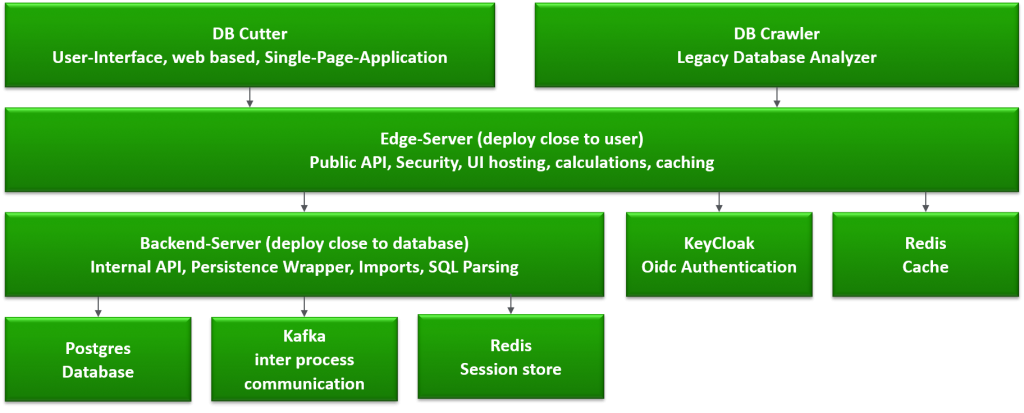
The Decompose consists of three main components:
-
Decompose Web UI
-
The DB Crawler
-
The backend with its database
The components are built as an n-tier architecture. The communication with the Phaidon stack, that is the Monolith Cutter, is done by using Apache Kafka as event-driven backplane. The figure below shows the relation between the user and the databases.
What is Decomposition?
When working on large legacy applications, you usually do not want to modernize that with a big bang release. Instead, you could want to modernize iteratively, moving parts of the old application to a new architecture and infrastructure.
The end goal is to iteratively migrate a monolithic application to a cloud native technology stack. For this purpose, the user chooses tables (or application endpoints) that belong together and creates Microservices from that, including source code and data.
-
You can create Taxonomies which means you tag a set of modules with a name
-
You can automatically tag modules that belong together to a sub-application
-
You can automatically tag modules that are accessing shared data
-
You can visually edit taxonomies
-
You can define sub-applications within your large legacy application. In Domain Driven Design, these would be called domains, or Bounded Contexts
-
You can ask the Decompose to automatically split your application into domains
What is a Bounded Context?
For the Decompose, it is essential to divide the the legacy application into a set of bounded contexts. Each bounded context can become a microservice, consisting of its own database.
Each bounded context contains multiple modules and may be shared between contexts.
A module is a class or code file of an arbitrary legacy language.
Each module can contain SQL queries to the legacy database. The Decompose investigates the queries and thus knows the relation between contexts, modules and data in tables/columns.