BC Candidate Reports
Use BC Candidate Reports to validate bounded context candidates generated and refined in earlier steps. These reports turn the current decomposition state into tables that are easier to review, compare, and export. Use them when you need evidence for boundary decisions before finalizing bounded contexts.
Before running these reports, complete:
Open the report area from Decomposition > BC Candidate Reports. Each report includes download actions, sortable table columns, and pagination controls.
Candidate Edges
The Candidate Edges report highlights cross-context relationships that may indicate coupling between proposed bounded contexts. It is useful for spotting boundaries that still need refinement after graph-based editing. Review this report when you want to understand where modules still connect across candidate contexts.
Open the Candidate Edges page from Decomposition > BC Candidate Reports > Candidate Edges.
The screenshot below shows the Candidate Edges report layout.
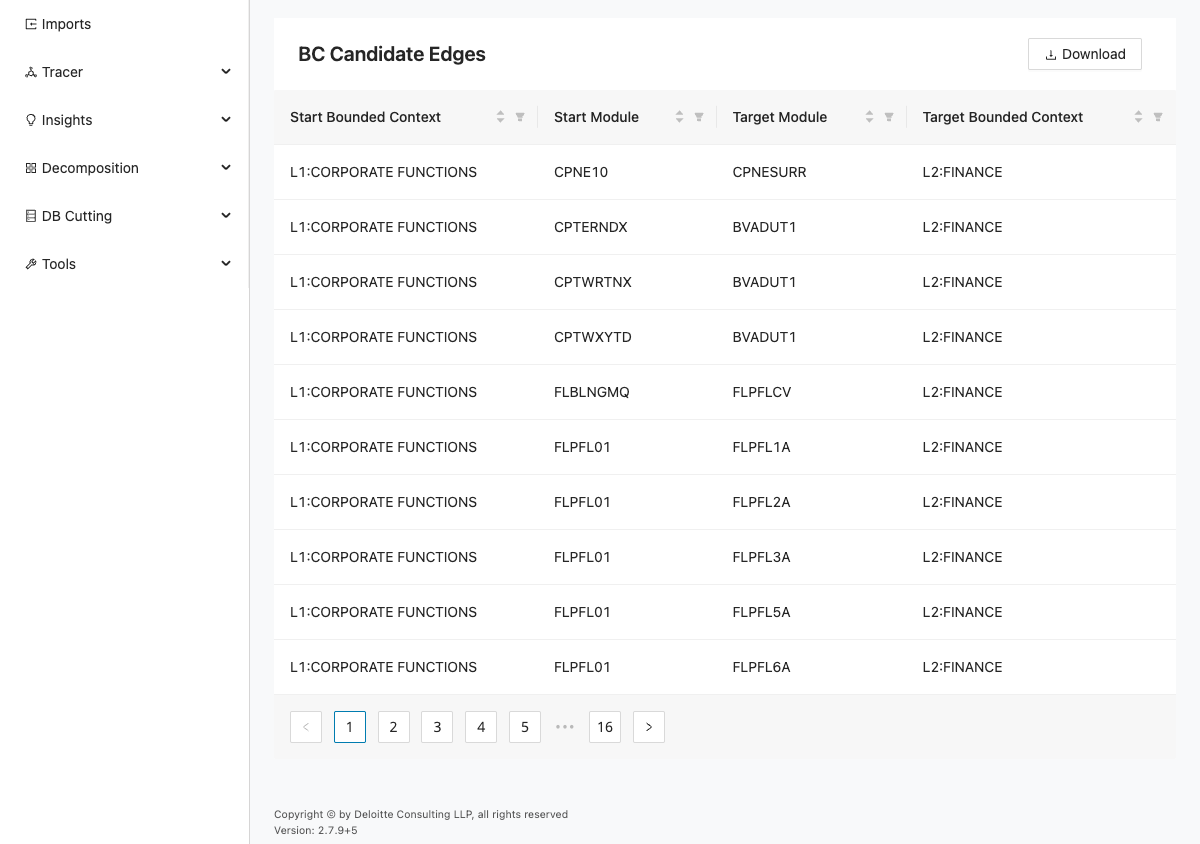
This report shows candidate relationships between modules and bounded contexts. The page contains Download and a table with the following columns:
| Column | Description |
|---|---|
| Start Bounded Context | Source bounded context for the candidate relationship. |
| Start Module | Source module for the candidate relationship. |
| Target Module | Target module for the candidate relationship. |
| Target Bounded Context | Target bounded context for the candidate relationship. |
The table headers are sortable and the standard pagination controls are shown below the table.
- The table is populated with candidate edges after decomposition and bounded context conversion.
- Each row identifies a source context/module and target context/module pair.
- Live validation captured 10 table rows.
Use this report to identify unexpected cross-context edges. If you see misclassified relationships, return to Bounded Context Graph and move modules to reduce unnecessary cross-context dependencies.
Connection Summary
The Connection Summary report aggregates context-to-context traffic so you can identify heavily connected pairs at a glance. It helps you prioritize which boundaries deserve a closer architectural review. Use it when the detailed edge list is too granular and you need a higher-level picture of coupling.
Open the Connection Summary page from Decomposition > BC Candidate Reports > Connection Summary.
The screenshot below shows the Connection Summary report layout.
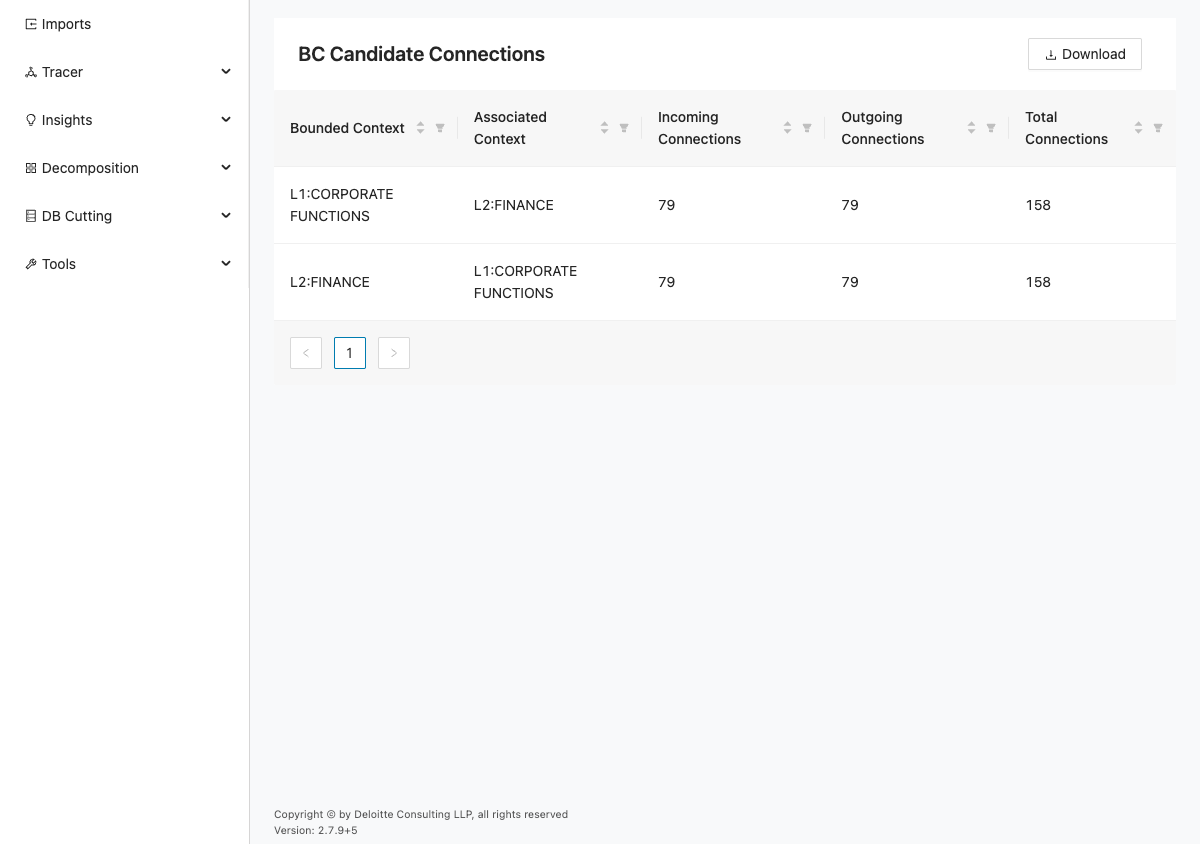
This report provides a bounded-context summary of incoming and outgoing connections. The page contains Download and a table with the following columns:
| Column | Description |
|---|---|
| Bounded Context | Bounded context shown in the summary. |
| Associated Context | Related context paired with the bounded context. |
| Incoming Connections | Number of incoming connections for the context pair. |
| Outgoing Connections | Number of outgoing connections for the context pair. |
| Total Connections | Total number of connections for the context pair. |
The table headers are sortable and standard pagination controls are shown below the table.
- The table is populated with bounded context pairs and connection counts.
- Total Connections helps prioritize contexts that need boundary refinement.
- Live validation captured 2 table rows.
Use this report to find heavily coupled context pairs. Then revisit Bounded Context Graph to inspect and adjust module placement on the related edges.
Access Pattern Report
The Access Pattern Report brings database access behavior into the bounded context candidate review. It shows where modules within a candidate context read from or write to shared tables and columns. Use it to confirm ownership assumptions and to find data hotspots that may require additional design work.
Open the Access Pattern Report page from Decomposition > BC Candidate Reports > Access Pattern Report.
The screenshot below shows the Access Pattern Report layout.
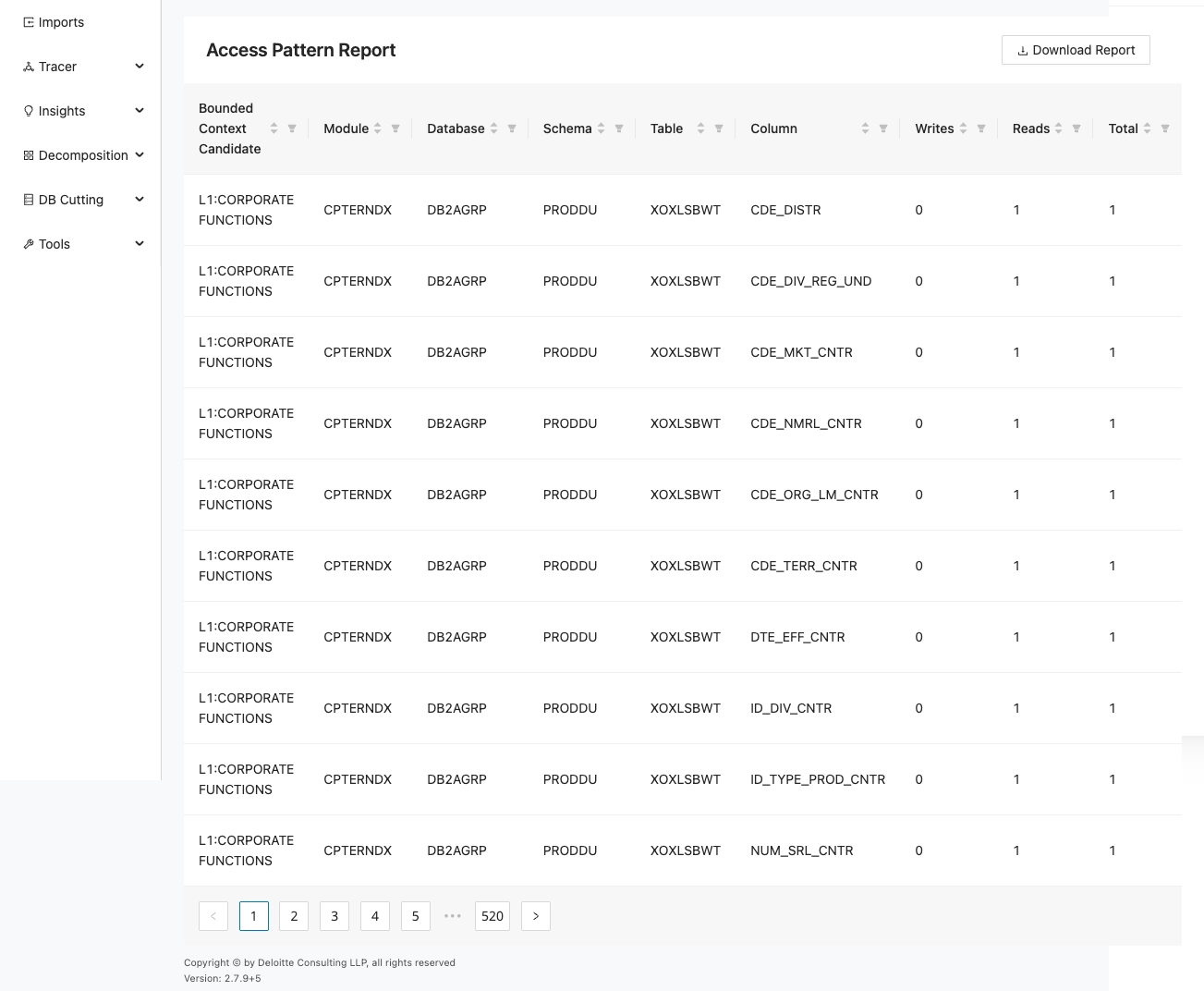
This report shows data-access activity associated with bounded context candidates and modules. The page contains Download Report and a table with the following columns:
| Column | Description |
|---|---|
| Bounded Context Candidate | Bounded context candidate tied to the access record. |
| Module | Module tied to the access record. |
| Database | Database for the access record. |
| Schema | Schema for the access record. |
| Table | Table for the access record. |
| Column | Column for the access record. |
| Writes | Number of writes recorded. |
| Reads | Number of reads recorded. |
| Total | Total reads and writes recorded. |
The table headers are sortable and standard pagination controls are shown below the table.
- The table is populated with data access records (reads/writes/total) by candidate context and module.
- Shared table access across multiple contexts is visible in the Database, Schema, and Table columns.
- Live validation captured 10 table rows.
Use this report to find data ownership conflicts and shared-table hot spots. If a context boundary looks incorrect, go back to Bounded Context Editor or Bounded Context Graph, adjust contexts, and rerun the reports.