Code Discovery
In this chapter, you'll learn how to initiate the Code Discovery process. The platform automatically identifies and categorizes code by programming language and type, giving you a comprehensive overview of your application portfolio. You will see an application view that highlights overall complexity, executable source files, and dependencies. Additionally, Mining helps ensure your application code is complete and verifies that it can be executed successfully.
Before you start, complete the Pre-discovery workflow to validate the source inventory, encoding, file layout, and language-specific prerequisites before the first Discovery run.
Preparatory steps
Before you can run Discovery, finish the Pre-discovery workflow and then perform the following preparatory steps. These tasks make sure your source modules, project linkage, and server connection are in place before analysis starts. Completing them first reduces rework later when you configure or execute Discovery.
Step 1:
Begin by importing the source modules. If there is already an existing Eclipse project with the legacy project nature, you can import it with the import wizard. Simply select Import... from the context menu and then, in the window that opens, select Existing Projects into Workspace. Otherwise, you must create a new project and add the client source modules.
Configuration
Note that Natural sources need to be extracted from the mainframe in SYSTRANS format using the SYSOBJH utility.
Step 2:
Ensure that you are connected to a mining server (see Mining API Server Connection).
Step 3:
If the target client or project does not exist yet, create it in the Mining web UI before you continue.
Step 4:
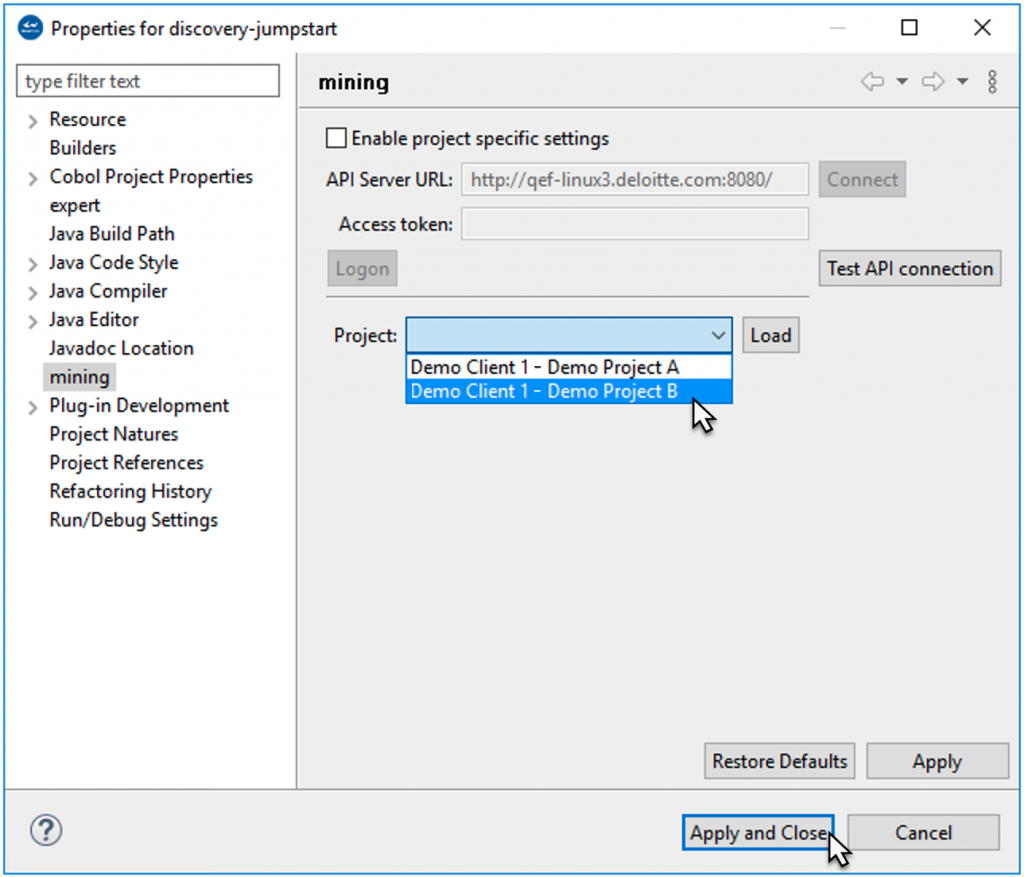
Use the context menu of the project to link the Eclipse project to a mining project on the API server. To do so, right-click the project, choose Properties > mining from the context menu, and then select your desired project from the drop-down menu. Click Apply and Close to complete the action.
Step 5:
After completion of the above steps, you can move on to configuring and executing Discovery.
Discovery configuration
This section introduces the Discovery configuration workflow and the options available to you.
You will learn when the default configuration is sufficient and when a customized Discovery_Config.xml is the better choice.
Use the following subsections to download, adjust, and apply configuration files before running Discovery.
Update the configuration before Discover Code
Download, edit, and upload the configuration files before you run Discover Code when the source package, folder structure, search order, or language settings differ from the default behavior.
Discovery with default settings
If you choose to run discovery with the default settings, you will use a default Discovery_Config.xml file that is stored on the mining database.
Info
Optional: You can view this config file by right-clicking the project and selecting discovery > Advanced > Download Configuration from the context menu to download the Discovery_Config.xml file to the workspace.
Discovery with customized settings
Alternatively, you can customize the Discovery_Config.xml file and specify your desired settings. To do so, right-click the mining project in your Eclipse workspace and select discovery > Advanced > Download Configuration from the context menu to download the Discovery_Config.xml file to the workspace.
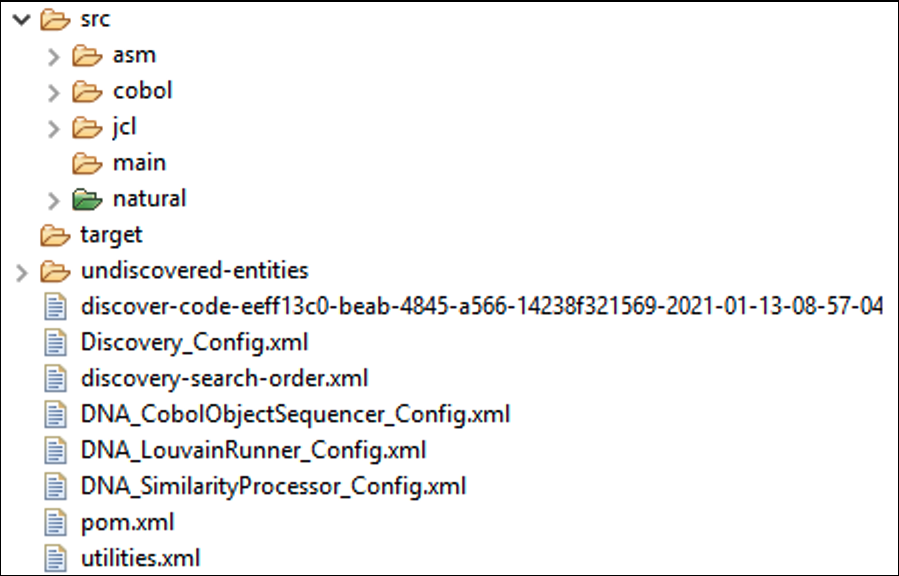
This will create several configuration files in the root of your project:
-
Discovery_Config.xml: the main configuration file -
discovery-search-order.xml: configures the order in which dependencies are resolved on complex projects -
utilities.xml: configuration of project-specific third-party utilities -
DNA_Sequencer_Config.xml,DNA_SimilarityProcessor_Config.xmlandDNA_LouvainRunner_Config.xml: configuration files for the DNA feature
Use the following guidance when deciding which files to update:
| File | Change it when | Typical outcome |
|---|---|---|
Discovery_Config.xml |
You need to change enabled languages, parser behavior, margins, extensions, folder retention, or output options. | Discovery processes the uploaded source with the updated defaults. |
discovery-search-order.xml |
Dependencies are ambiguous, copybooks or procedures resolve from specific libraries, Java spans multiple package roots, or same-named DB objects appear across schemas. | Discovery resolves dependencies against the correct targets. |
utilities.xml |
Project-specific utilities need special handling instead of showing up as ordinary missing dependencies. | Discovery can treat configured utilities differently during dependency processing. |
| DNA configuration files | You need to tune the DNA feature after Code and Metrics discovery are already stable. | DNA processing uses project-specific sequencing or clustering options. |
Configuration
By default, the configuration is synchronized automatically when selecting any of the other Discovery commands. To view and edit the latest configuration before triggering an action, it can be uploaded to the mining server by selecting the context menu discovery > Advanced > Upload Configuration.
Scope the upload package
Before the first upload, decide which folders belong in the Discovery scope.
- Exclude generated code, test-only artifacts, build output, vendor drops, duplicate deliveries, and other out-of-scope content from the selected source directories or upload archive.
- Keep only the source that should produce Discovery results for the target application landscape.
- If excluded content still affects dependency interpretation, record that gap in the source inventory before the first run.
- Apply the same scope rules again before any forced full upload.
Discovery_Config.xml
This is the main Discovery configuration file, which allows for configuration of a large number of options for both Discover Code and Discover Metrics:
Key settings quick reference
Use this table to decide which settings are worth reviewing before the first run.
| Setting | Default or common use | Change it when |
|---|---|---|
ENABLE |
All languages are enabled by default. | Disable languages that are not present to improve speed and reduce false positives. |
PARSER_TIMEOUT |
Language-specific. | Increase the timeout for very large modules or slow parser workloads. |
RETAIN_FILE_EXTENSION |
false |
Set to true when the original source extension must be preserved. |
cobol_ims_dependencies |
false |
Set to true when IMS programs, databases, or control blocks are part of the source landscape. |
| COBOL parser margin settings | Standard fixed-column layout. | Change the margins when COBOL source uses non-standard columns. |
retain_dir_structure |
true |
Set to false when you want to flatten the discovered directory hierarchy. |
exclude_utility |
Project-dependent. | Enable it when project utilities should receive special handling through utilities.xml. |
COBOL_PGM_ID_AS_NAME |
false |
Set to true when module names should come from the PROGRAM-ID paragraph instead of the file name. |
Mappings
The <mappings> section of the config allows specifying where Discover Code places files with a certain file name or file type. Regardless of the setting, identified files are always placed in a language-specific folder inside the "src" folder. For example, Cobol files are always placed underneath "src/cobol" and Java files are placed in "src/java". Mappings allow to customize whether additional sub-folders are created underneath this language-specific folder (→ see also the <retain_dir_structure> setting).
The default mappings create additional sub-folders based on the file type, that is, separate folders will be created for programs, jobs, copybooks, etc.
Properties
The <properties> section allows for tweaking language-specific properties. All languages support the ENABLE, PARSER_TIMEOUT and RETAIN_FILE_EXTENSION properties.
Common properties
ENABLE
The ENABLE property can be set to false to disable processing of a language entirely. It is mainly useful for Discover Code. Since Discover Code tries to guess the file type of the source files, disabling languages that you know for sure do not occur in the source base can greatly speed up the process and increase its accuracy. Nonetheless, the setting is also applied to Discover Metrics and can be useful to speed up the Discovery process.
When the "src" folder contains source files in a language that is disabled via the configuration and "Discover Metrics" is run, then these files are not processed and will show up on the "Undiscovered" Excel sheet.
PARSER_TIMEOUT
The PARSER_TIMEOUT setting configures the maximum time in seconds that is used to attempt to parse a file. If the file can not be parsed successfully within this threshold, then the Discovery of the file is aborted, and no metrics or dependencies will be collected for the file. A separate PARSER_TIMEOUT can be configured for each language.
RETAIN_FILE_EXTENSION
The RETAIN_FILE_EXTENSION setting determines whether Discover Code preserves the original file extension. When set to "false" (the default), then a language-specific extension is applied, for example, Cobol files will get a ".cbl" extension.
Settings for ASSEMBLER language
UNKNOWN_TOKEN_THRESHOLD
This setting applies to Discover Code only. Sets the percentage of unknown tokens that may be contained in the file. If the file contains more unknown tokens than the threshold, then the file will not be classified as "ASSEMBLER".
Settings for BINARY language
PRINTABLE_CHAR_THRESHOLD
This setting applies to Discover Code only. Sets the percentage of printable characters that may be contained in a file. If the percentage is lower than the threshold, then the file will be classified as "BINARY".
Settings for COBOL language
COPYBOOK_PIC_THRESHOLD
This setting applies to Discover Code only. Sets the threshold for certain strings that typically occur in a copybook. If a file contains more than the configured percentage, then the file is classified as a COBOL copybook.
COBOL_PGM_ID_AS_NAME
These settings apply to Discover Metrics only. Determines how mining Modules for Cobol programs are named. When set to "false" (the default), the name of the Module will be equal to the file name, for example, if the file name is "EXAMPLE.cbl", then the program will be named "EXAMPLE". When set to "true", the value of the PROGRAM-ID paragraph inside the program is used instead.
cobol_ims_dependencies
Enable this setting when IMS programs, databases, or control blocks are part of the source landscape. Review it before the first Discover Code run because IMS dependencies are not collected when it remains disabled.
COBOL parser margin settings
Before Discover Code, verify whether the source uses standard COBOL columns 1-6, 7, 8-72, and 73-80. If the source uses a client-specific layout, update the COBOL parser margin settings before the first run to avoid parse errors and unexpected language classification.
Settings for CSD language
CSD_PARSER_DUMPXML
This setting will be removed with WMIN-5350 and should not be used.
Settings for JCL language
STEP_NAME
This setting can be specified multiple times and applies to Discover Metrics only. Despite its name, this setting does not configure any step names. Instead, it identifies DD names where the associated data sets will be identified as JCL control cards.
DD_KEYWORD
These settings list some parameter keys on DD statements, which are then treated in some way.
Settings for NATURAL language
DECIMAL_CHARACTER
Sets the character that is used as the decimal separator in Natural source files. This needs to be configured properly to parse Natural files successfully.
INPUT_DELIMITER
Sets the character that is used as the Natural input delimiter. This needs to be configured properly to parse Natural files successfully.
LANGUAGE_CODES
Sets which natural language codes to use when resolving dependencies. The language code is used to replace ampersand characters (&) in references to language-specific objects (for example, maps, dialogs, helproutines, subprograms).
Settings for ORACLE language
CDO_PATTERN_THRESHOLD
This setting applies to Discover Code only. Sets the threshold for certain strings that identify a file as a CDO file. If the file contains more than the configured percentage, it will be classified as CDO.
SQLMOD_PATTERN_THRESHOLD
This setting applies to Discover Code only. Sets the threshold for certain strings that identify a file as an SQLMOD file. If the file contains more than the configured percentage, it will be classified as SQLMOD.
Settings for PL1 language
PL1_PARSER_MARGIN_START
Configures the first column in PL/I files that contains source code. The contents of columns before this are treated as comments. Setting this property correctly is important for successfully parsing PL/I files.
PL1_PARSER_MARGIN_END
Configures the last column in PL/I files that contains source code. The contents of columns after this one are treated as comments. Setting this property correctly is important for successfully parsing PL/I files.
PL1_PARSER_ANS
Configures the column that contains printer control characters for PL/I.
PL1_PARSER_OR_SYMBOL
This setting can be specified multiple times and allows for defining additional symbols for the "OR" operator (for example, "|", "∨").
PL1_PARSER_NOT_SYMBOL
This setting can be specified multiple times and allows for defining additional symbols for the "NOT" operator (for example, "!", "¬").
Settings for VMS language
FMS_PATTERN_THRESHOLD
This setting applies to Discover Code only. Sets the threshold for certain strings that identify a file as an FMS file. If the file contains more than the configured percentage, it will be classified as FMS.
DCL_PATTERN_THRESHOLD
This setting applies to Discover Code only. Sets the threshold for certain strings that identify a file as a DCL file. If the file contains more than the configured percentage, it will be classified as DCL.
Settings for JAVA language
INCLUDE_PACKAGES
The setting INCLUDE_PACKAGES contains the filter for the packages to be included.
-
An empty value means that all packages of the source folder should be included in the discovery
-
When a pattern is specified, then only matching packages and all compilation units, whose package declaration matches the include pattern, are included by the discovery
By default, only (and all) packages inside the source folder are analyzed. If you want to see dependencies on third-party libraries, you need to include their package names here.
EXCLUDE_PACKAGES
The setting EXCLUDE_PACKAGES contains the filter for the packages to be excluded.
-
An empty value means that no packages are excluded in the discovery
-
When a pattern is specified, then all matching packages and all compilation units, whose package declaration matches the exclude pattern, are excluded by the discovery.
Settings for ECL language
ECL_PATTERN_THRESHOLD
This setting applies to Discover Code only. Sets the threshold for certain strings that identify a file as an ECL file. If the file contains more than the configured percentage, it will be classified as ECL.
File detection types
The <file_detection_types> section allows us to determine the order in which Discover Code applies techniques for identifying file types. The "MAIN" type uses language-specific parsers to parse the contents of files. The "TOKEN" type looks for specific tokens (strings). The "DEPENDENCY" type looks for references to other files (for example, identifying a file as a copybook by the fact that it is being included by a program). The "EXTENSION" type identifies files by their existing file extension.
Usually, there is no need to change this setting.
Other settings
<retain_dir_structure>
This setting determines whether Discover Code preserves the original directory structure when copying identified files to the source folder. The language-specific source folder (for example, "src/cobol") will be prepended to the original directory structure, and the additional sub-folders configured in "
<exclude_utility>
This option enables special treatment of the Modules described in the "utilities.xml" file. When set to "false", utility processing is disabled, and references to utilities will be treated like any other kind of dependency (which effectively means that utilities will most likely show up as "MISSING" Modules, since they are usually not part of the code base). For some languages, setting this to "true" also enabled additional processing. For example, it enables the parsing of utility-specific control cards for JCL
The name "exclude" of this property might be misleading. Setting it to "true" actually enables special handling of the utilities. It is historically called "exclude" because the utilities are being excluded from regular dependency processing, receiving special treatment instead.
<collect_statements>
Whether Statements are collected during Discover Metrics. Disabling this may (slightly) speed up the Discovery process, but the "Statements" sheet in Excel will be empty.
<undiscovered_folder>
The name of the folder in the root of the project where files are moved by Discover Code when their file type cannot be identified. The default is "undiscovered-entities".
<output_format>
Set to "EXCEL" or "CSV" to automatically download the Discovery results after running Discover Metrics in the specified format. Note that, regardless of this setting, you can always download the results in any format through the "Export" page on Mining UI.
Settings for special DDs
The special DDs listed below are supported.
-
SYSDUMP
-
SYSABEND
-
SYSMDUMP
-
SYSUDUMP
-
SYSCHK
-
SYSCKEOV
If dependencies from these DDs need to be ignored, add a tag to Discovery_Config.xml with the DD_IGNORE_DEPENDENCY key as shown below.
To get the proper metrics, rerun a discovery on existing projects. If the incremental scan feature is enabled, it must be disabled while re-running the project(s) so that the new metrics include the required changes.
discovery-search-order.xml
The discovery-search-order.xml file is used to tell the Discovery how to resolve ambiguous dependencies. For example, if one program makes a call to another program named "FOO", but there are multiple programs available in the source code with the name "FOO", then the Discovery doesn't know which one is called. This situation arises very frequently in real-world data because the source code is often structured into several projects or libraries, many of which often contain programs, jobs, or routines with the same names. The dependencies between these projects or libraries are often defined through build scripts or configuration files, which may or may not be part of the source code. As of now, Discovery cannot automatically determine these inter-project dependencies, and therefore, it is usually required to manually configure a discovery-search-order.xml.
You can tell that you probably need to configure a search order if you see the message "Multiple possible candidates found" frequently in the Discovery error sheet. It indicates that Discovery was not able to determine the target of a dependency because there were multiple possible candidates. In such a situation, Discovery does not create any dependency and instead generates this error message to not provide incorrect information.
Please note that many languages (for example, Cobol, Natural, PL/I, ...) make use of "assembling" where the source code is pieced together from several files ("copybooks", "copycodes", etc.). It is often required to have a properly configured discovery-search-order.xml to assemble and parse those files successfully. Therefore, a high number of parse errors could also indicate that you need to configure the search order correctly.
Use the following decision guide when deciding whether a project-specific search order is required:
| Scenario | Configure search order? | Why |
|---|---|---|
| Java spans multiple project roots or package roots | Yes, always | Java dependency resolution depends on explicit package-root targets. |
| COBOL copybooks or JCL procedures live in separate libraries | Yes | Include and procedure resolution must point to the correct library first. |
| Multiple repositories contain same-named modules | Yes | Prevents ambiguous dependency resolution and repeated "Multiple possible candidates found" warnings. |
| Multiple DB schemas contain same-named objects | Yes | Use <contained-in> rules to disambiguate schema-level dependencies. |
| One self-contained project has no repeated module names | Usually no | The default search order is often sufficient for the first run. |
Basic search order configuration
The discovery-search-order.xml file can configure any number of search orders. For each <search-order> one <source> and any number of <target>s (at least 1) can be defined. When resolving a dependency (or looking for include files during assembling), the discovery processes the configured search orders from top to bottom. It matches the current file (the file declaring the dependency or the file currently being assembled) against the <target> specifications is evaluated from top to bottom. The discovery will consider only dependency candidates that match the current <target>. If no such candidates exist, then the next <target> is tried. If there are no more targets in the current search order, then Discovery tries to find the next search order where the current file matches the source. If no search order matched or no targets were found, the dependency remains unresolved.
The default search order configuration looks like this:
It defines a single <search-order> where that
Info
The * Wildcard matches one path segment or part of a file name. The ** Wildcard matches any number of path segments (0 or more).
Here is a typical example of the search-order configuration required to assemble COBOL files properly:
This configuration tells discovery to assemble Cobol programs (files ending in .cbl) in the sub-project "projectA" using copybooks (files ending in .cpy) from the same project. The same is configured for "projectB". You can imagine a similar configuration for other languages, for example, for configuring the "proclib" for JCL.
Info
The path patterns are always relative to the root folder of your Discovery project and always start with "src" (or a wildcard character).
Special configuration for Java projects
Java projects often require a special search-order configuration to resolve any kind of dependency correctly. The reason for this is that Java uses the folder structure to define "packages". The root of this package hierarchy is the source folder. By default, the folder "src/java" is treated as the root of the package hierarchy. However, when running Discovery on Java projects, you typically have multiple projects, each with its own source folder. For example, your source folders might look like this:
-
src/java/project-1/src/main/java -
src/java/project-2/src/main/java -
src/java/project-3/src/main/java
Here we have three projects, each with its own source folder. The root of the package hierarchy for each project is the "src/main/java" folder inside each project folder. In this situation, it is mandatory to configure a discovery-search-order.xml. When configuring the search order for Java projects:
-
the
<source>pattern defines the root of the package hierarchy - it must give the full path to the project's source folder without using wildcards, but must then use wildcards to match all.javafiles contained within -
the
<target>patterns define where to look for dependencies by giving the location of additional package roots. You must even include a<target>for the same project, if you want to resolve dependencies within one project.
Here is an example search order configuration for the above project constellation. Let's further assume that "project-1" depends on "project-2" and "project-2" depends on "project-3". So "project-1" must be able to resolve classes from "project-2" and "project-2" must be able to resolve classes from "project-3". The search order is configured accordingly:
Additional properties
The discovery-search-order.xml configuration has additional properties that can be specified to describe the source and target.
The following properties can be specified as below:
-
name: the name of the target module (currently supports exact match only, that is, no placeholders) -
type: the expected type of the target module -
path: the exact path of the expected target - can be used as an alternative to a pattern when no wildcards are being used -
contained-in: as a separate sub-element: describes the "parent" module of the expected dependency
When resolving dependencies of modules of type "COBOL_PROGRAM" with path pattern "src/test/cobol", this configuration specifies that the "SQL_TABLE" modules contained in the "TEST-SCHEMA" schema are considered first before all other targets are attempted.
Important: To link discovery dependencies correctly with the imported DB schema, you must proceed in the following order:
-
Import the DB schema
-
Configure search-order if necessary
-
(Re-)run Discovery
Discovery directory structure
At the beginning of a Mining project, before the first Discovery is executed, the project contains the sources that need to be analyzed. The Discover Code step then identifies and moves these sources into a predefined directory structure.
Some folder names are therefore reserved, and the following file naming conventions apply:
-
Discover Code moves all identified files into a directory called
src. Undiscovered files, that is, files that have yet to be analyzed, shall therefore not be placed in a directory with this name, since Discover Code can not be executed on thesrcfolder. -
Identified files are sorted into
src/<language>directories. By default, the original folder structure is preserved underneath that path. If the original file was a Cobol program located in a folder calledundiscovered/foo/bar, then it will be placed intosrc/cobol/foo/bar.
This behavior can be adjusted in the discovery_config.xml file. -
Files that can not be recognized uniquely in language, but a language can be assumed, are moved to a folder
/src/maybe/<language>/, withbeing replaced by the assumed language. -
Discover Code moves all unidentifiable files into a directory called
undiscovered-entities. This directory name is therefore reserved and should not be used to designate undiscovered files.
Configuration
The name of the src folder where successfully identified files are moved is predefined and cannot be changed. The name of the undiscovered-entities folder, however, can be changed via the discovery_config.xml file.
Cross-project Java dependency support
It is common for a Java code base to consist of multiple projects that have dependencies on each other.
By default, these dependencies are not captured during the Discovery. To enable support for cross-project Java dependencies, the discovery-search-order.xml file needs to be added and configured in the Mining project's root directory.
The default configuration looks as follows:
The source pattern attribute defines the path from which the Java class files need to be considered for examining any cross-project dependency. The target pattern attribute defines the path where these Java dependency classes exist. These settings are used for assembling source files, for instance, programs using copybooks, and for dependency resolving.
Example
The configuration below will pick each class inside the project "project1" and check if that class contains any reference (dependency) to another class that exists in the project "project2".
Consider the following example code for the classes "project2\in\example\MyClass2" and "project1\com\example\MyClass1":
The example configuration above will capture that the module MyClass1 has a cross-project dependency on in.example.MyClass2.
utilities.xml
Use utilities.xml when the project contains third-party or client-specific utilities that should receive special handling during Discovery instead of being treated as ordinary dependencies.
A typical workflow is the following:
-
Define the utility modules in
utilities.xml. -
Review
exclude_utilityinDiscovery_Config.xmlwhen you want Discovery to apply utility-specific handling. -
Upload the updated configuration before running Discover Code or Discover Metrics.
If utility modules continue to appear as missing dependencies, review both utilities.xml and exclude_utility together before rerunning Discovery.
Running Discovery
This section covers the execution of the following Discovery operations. Run these operations in sequence to move from source ingestion to technical analysis and similarity grouping. The summaries below explain what each stage produces so you can choose the right action for your project state.
-
Discover Code: Discovery starts with this step, in which the code base is scanned, analyzed, and reorganized by language and module type.
-
Discover Metrics: In this step, the discovered code is closely inspected and evaluated by content, dependencies, complexity, and other criteria to provide detailed charts and reports in the Metrics UI.
-
Discover DNA: The purpose of the DNA analysis is to find similar modules in a code base and group them. This allows us the measure how similar code is, find patterns, and, for example, accelerate mining and modernization.
To create these clusters, Discovery sequences the code base's DNA and compares each module's DNA sequence to calculate its distance. Modules with similar DNA, that is, small distances, are then bundled into clusters.
Configuration
All Discovery features, that is, Discover Code, Discover Metrics, and Discover DNA, trigger a source code upload. To improve the speed of uploads, only sources that have changed since the previous Discovery are uploaded in subsequent executions. To force a re-upload of the full code base, select the directories with the source modules, right-click them, and select discovery > Advanced > Upload Source Code from the context menu.
Source upload behavior
All Discovery actions trigger a source upload. Use the initial run to upload the full source set, and expect later runs to upload only changed files.
- Discover Code, Discover Metrics, and Discover DNA synchronize source changes before the remote job starts.
- Use discovery > Advanced > Upload Source Code when you renamed, split, or reorganized many files and want to force a full re-upload.
- Review the pre-discovery checks before forcing a full upload so the server receives the corrected package.
- When a file exceeds the 16 MB encoded content limit, Discovery prompts you to continue with the large-file upload, skip the file, or stop and correct the source package first.
- Exclude generated code, test fixtures, build output, duplicate deliveries, and other non-scope content before you trigger the upload so they do not create avoidable noise in
src/maybeorundiscovered-entities.
API and scripted uploads
Automation can use an approved API client or integration to upload the prepared source package instead of relying on the interactive Eclipse workflow.
- Use the same target Mining project, source selection, and uploaded Discovery configuration that you would use for an Eclipse-driven run.
- Apply the same pre-discovery exclusions before packaging the archive for automation.
- Confirm the server-side Discovery upload size limit when large archives are expected.
- Validate the first automated run the same way you validate a manual run: review the resulting
srclayout,undiscovered-entities,src/maybe, and the downloaded job log.
Discover Code
Info
Discover Code does not need to be performed on imported Natural sources. The natclipse importer already places the sources into their correct libraries within src/natural and adds the correct file extensions to the source files. Discover Code also does not need to be performed on imported Java sources because the system retains the source folder structure by default. For more information on this, please refer back to Special Configuration for Java Projects
At this first discovery step, the miner must have maximum information about the types of client sources.
The sources for some languages initially do not have identifying extensions (as Natural programs, for example, with .nsp). The discovery process attempts to identify the correct types with parsing.
For ambiguous source structures, this can result in many artifacts in the folders /undiscovered-entities or /src/maybe.
To improve discovery results, it is recommended to apply the correct extensions to the source artifacts so they can be distinguished uniquely for a type. Adequate extension can be set by users with specific language knowledge, or the modules can be sorted into the correct folder at /src manually.
The following table shows recommended extensions and folders for sources by language and type:
| Language | Type | Extension | Identification |
|---|---|---|---|
| Cobol | Program | cbl | accurate |
| Copybook | cpy | ||
| BMS | map | ||
| MFS | |||
| Batch | Job | job | |
| Proc | proc | ||
| Assembler | Program | asm | accurate |
| Macro | asm | accurate | |
| PL/I | Program | pl1 | |
| Mainprogram | pl1m | ||
| Copybook | pcpy | ||
| SubRoutine | pl1m | ||
| Natural | Program | nsp | |
| Subprogram | nsn | ||
| Subroutine | nss | ||
| Copycode | nsc | ||
| Map | nsm | ||
| Help | nsh | ||
| DDM | |||
| Data Area | |||
| Function | |||
| Text | |||
| Error Message | |||
| Class | |||
| CPM | |||
| Adapter | |||
| Dialog | |||
| REXX | |||
| C | Program | c | |
| Header | h | ||
| Function | |||
| Java | |||
| XML | xml | ||
| Binary | bin | ||
| VAX-VMS | DCL | ||
| FMS | |||
| VAX_MACRO | |||
| ORACLE | CDO_FILE | ||
| CDO_RECORD | |||
| SQLMOD | |||
| CSD | LIST | ||
| EXTRACT | |||
| Easytrieve | .ezt | ||
| IMS-Cobol | Program | ||
| Copybook | |||
| IMS-JCL | Job | job | accurate |
| Proc | proc | difficult | |
| IMS | Program Specification Block PSB | psb | |
| Database definition DBD | dbd | ||
| ARCHDEF | |||
| HDAMPARM | |||
| TDFXTRCT | |||
| TEMPLATE | |||
| BASIC | PROGRAM | ||
| SUB_ROUTINE | |||
| FUNCTION | |||
| OBJECT | |||
| C++ | Program | cpp | accurate |
| Header | hpp | accurate | |
| C# | CompilationUnit | cs | |
| Namespace | cs | ||
| Class | cs | ||
| PartialClass | cs | ||
| Struct | cs | ||
| Interface | cs | ||
| Enum | cs | ||
| Attribute | cs | ||
| Record | cs | ||
| Project | csproj | ||
| Solution | sln |
Complete configuration changes before Discover Code
Review and upload Discovery_Config.xml, discovery-search-order.xml, and utilities.xml before the first run or whenever the source package changes. Discovery uses the latest configuration stored on the server.
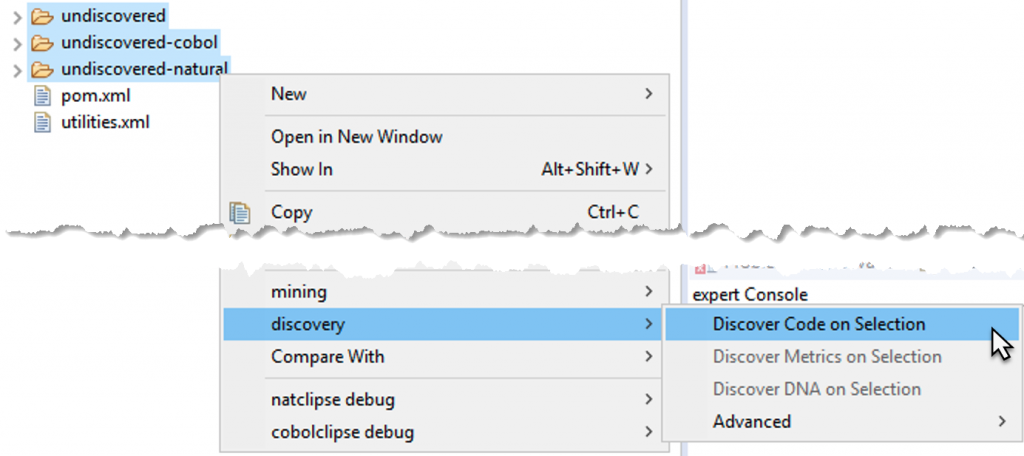
Once you have completed the preparatory steps and applied configuration settings, you can proceed with Discover Code. To do so, select the directories with the source modules, right-click them, and select discovery > Discover Code on Selection from the context menu. This step may take some time.
Info
To check the status/progress of Discover Code, open the Job View by selecting Window > Show View > Other from the Eclipse menu bar. Then type job view in the search field, select the Job View entry, and click Open. Now you can see the current state of the remote job, the elapsed and remaining time, and the result of the remote job.
Warning
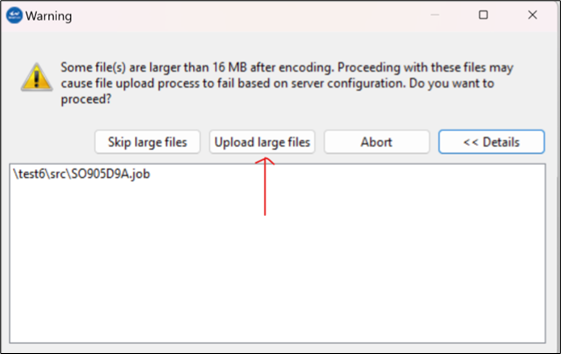
Discovery will show a warning message for a file size limit of 16 MB per file. For this limit, the file content size after encoding is considered, not the file size stored on disk. When a source file with a content size larger than 16 MB is uploaded, a window will appear, and the user can click "Upload large files" to allow the discovery to continue. Otherwise, skip the large files or abort the process.
When the discover code job is finished, a job log file named discover-code-
Configuration
It is possible to bypass source code upload when running Discover Code by holding down the Ctrl or Alt modifier key while selecting the option from the context menu.
After the first Discover Code run, review the results before continuing:
- Confirm that the expected languages and folder structure appear under
src. - Compare the discovered modules with your source inventory.
- Review
undiscovered-entitiesandsrc/maybe; they should be limited exception folders. - Open the job log to look for repeated parse failures, upload warnings, or ambiguous dependency messages.
- If the results do not match expectations, correct the source package or configuration and rerun Discover Code.
For common issues and rerun guidance, see Discovery troubleshooting.
Discover Metrics
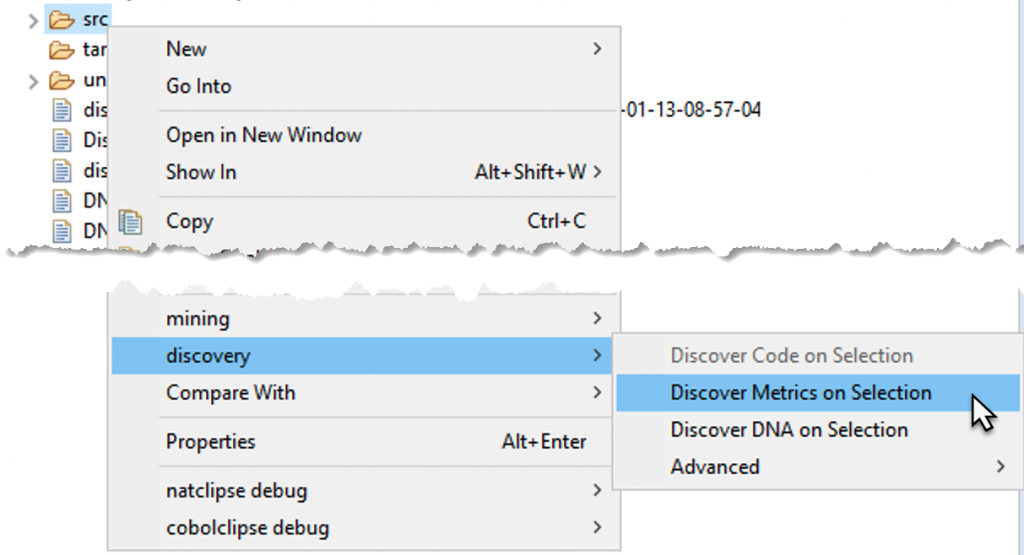
Next, you can run Discover Metrics on the sources. To do so, right-click the src directory and select discovery > Discover Metrics on Selection from the context menu.
Info
The Job View displays the status/progress of Discover Metrics. It shows the current state of the remote job, the elapsed time, and the remaining time, as well as the result of the remote job.
When the Discover Metrics job is finished, a job log file named discover-metrics-
Info
The existence of a log file depends on the configured log level in the log4j2.xml file. For example, if the log level is set to OFF or ERROR, no log file is created when only INFO events are triggered.
The results of the Discover Metrics step are either downloaded as an output file named
-
discovery_<time stamp>.xlsxif you ran discovery with default settings, or -
discovery_<time stamp>.csvif you customized the discovery and changed the output format in the config file.
Another result of Discover Metrics is the effort-summary-<time stamp>.xlsx file. This file is also automatically downloaded to the workspace.
Rerun Discover Metrics after any change to extensions, margins, search-order rules, utilities, or source layout that affects module identity or dependency resolution.
Configuration
It is possible to bypass source code upload when running Discover Metrics by holding down the Ctrl or Alt modifier key while selecting the option from the context menu.
Configuration
On Linux hosts, the fontconfig package must be installed as a requirement for the Excel file generation.
Incremental vs full Discover Metrics scan
Discovery can be configured to perform incremental scans via the feature toggle incrementalScan in the Web UI feature console.
When enabled, repeated Discover Metrics executions will only rescan modules that have been changed (for example, LoC or metadata) and their dependencies, instead of rescanning the full code base.
To circumvent incremental scanning and force a full Discover Metrics scan, right-click your project's src folder and select discovery > Advanced > Force Full Discover Metrics Scan.
Forcing a full scan will also force a full source code upload.

Discover DNA
Configuration
Performing Discover Metrics is a prerequisite for Discover DNA. If modules are changed in the project, both processes should be re-executed to update the results.
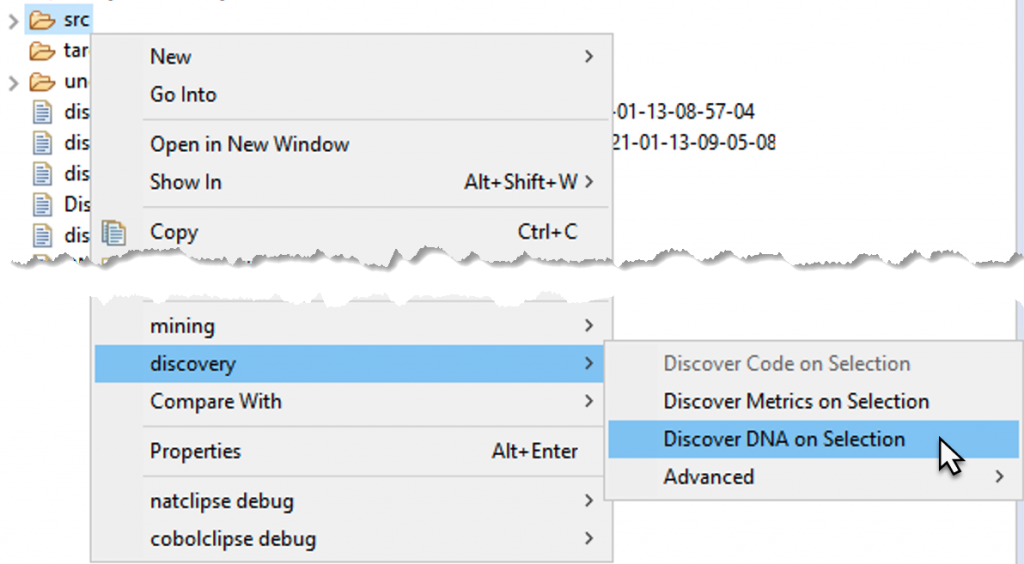
Subsequently, you can run discover DNA. Right-click the src directory and select discovery > Discover DNA on Selection from the context menu.
Info
The Job View displays the status/progress of Discover DNA. It shows the current state of the remote job, the elapsed time, and remaining time, and the result of the remote job.
When the Discover DNA job is finished, a job log file named discover-dna-<random id>-timestamp is automatically downloaded to the workspace.
Info
The existence of a log file depends on the configured log level in the log4j2.xml file. For example, if the log level is set to OFF or ERROR, no log file is created when only INFO events are triggered.
The results of the Discover DNA step can be downloaded from the Web UI by navigating to Exports > Download Modules in cluster. The downloaded file is a set of CSV files for each DNA type. The CSV file contains the list of similar modules, ordered by cluster ID.
Now you are ready to start mining. You can access the Web UI and find all the discovered modules in the project you selected in Preparatory Steps.